The TNREGINET portal is the official electronic backbone of the Tamil Nadu Registration Department. Managed by the Inspector General of Registration (IGR), it acts as an Integrated Grievance Redressal System (IGRS) that bridges 150 years of registration history with modern digital efficiency. For any citizen, advocate, or property buyer, this portal is the primary tool for legalizing land ownership and ensuring transaction transparency.
What is TNREGINET and Who Can Use It?
Core Services of the Inspector General of Registration (IGR)
Managed by the IGR based in Chennai, the portal oversees operations across all Registration Zones in the state. Key services available online include:
- Encumbrance Certificate (EC) Search: Verifying property liabilities and ownership chains.
- Land Registration: Digitally submitting documents and booking appointments.
- Guideline Value Search: Checking government-fixed minimum values for land.
- Vital Records: Applying for and tracking birth, death, and marriage certificates.
- Institutional Registration: Handling partnership firms, chit funds, and society certifications.
User Classifications: Citizen, Document Writer, and Advocate
TNREGINET utilizes a tiered access model to tailor services to professional requirements:
- Citizen: General access for individuals handling personal property registration, EC viewing, and vital records.
- Document Writer: Authorized access for drafting and submitting high volumes of documents; requires professional licensing data.
- Advocate: Specialized access for detailed title searches and legal verifications.
- Organization: Dedicated portal for government or non-profit entities for specific registrations.
Essential Property Verification Tools on TNREGINET
How to Search and View Encumbrance Certificate (EC) Online
The Encumbrance Certificate is the cornerstone of property due diligence. It provides a historical record of all registered legal and financial liabilities, such as mortgages and leases.
- Portal Access: Visit the official TNREGINET portal and select “E-Services”.
- Navigation: Click on “Encumbrance Certificate” and then “View EC”.
- Search Criteria: Input the Zone, District, and Sub-Registrar Office.
- Property Details: Enter the village name and survey/sub-division number.
- Search Period: Specify the date range; legal experts recommend a search covering at least 30 years to verify a clear title.
Understanding Form 15 vs. Form 16 (Nil EC)
When you download an EC, it is issued in one of two formats based on the history:
- Form 15: Lists all registered transactions, including sales, mortgages, and release deeds.
- Form 16 (Nil EC): Issued when no registered transactions are found for the requested period. While it suggests a lack of liabilities, buyers should still cross-check with physical land records.
Checking Tamil Nadu Guideline Value for 2025
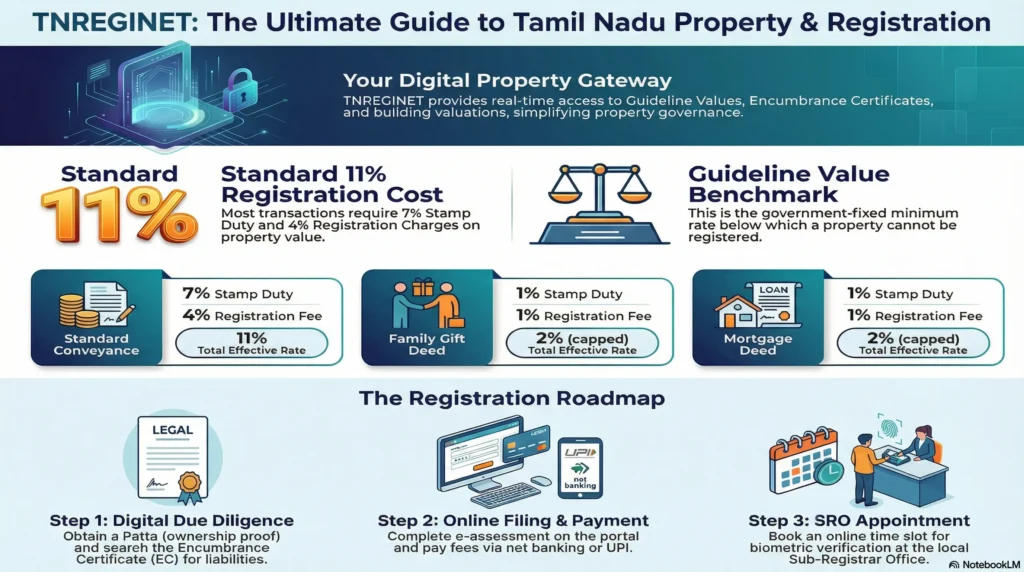
The “Guideline Value” is the government-fixed minimum price for land below which a property cannot be registered. This benchmark prevents undervaluation and ensures fair tax collection.
Finding Composite Values for Apartments and Plots
In 2025, Tamil Nadu continues to utilize the Composite Valuation system for apartments.
- Traditional Plots: Values are calculated per square foot or acre based on street classification.
- Apartments (Composite): The value includes the super built-up area, Undivided Share (UDS) of land, common amenities, and parking facilities.
- Calculation Tool: Users select “Guideline Value” on the homepage and search by street or survey number to find real-time 2025 rates.
Financial Compliance: Calculating Stamp Duty and Registration Fees
Current 2025 Rates for Property Transactions
Calculating the total financial burden is vital for budgeting:
- Standard Rates: As per the latest updates, stamp duty is generally 7% on the market value or guidance value (whichever is higher).
- Registration Fees: These are fixed at 4% for most conveyances, leading to an effective 11% burden on the buyer. (Note: Some 2024 updates suggest a reduction in registration fees to 1% for certain transactions).
- Example: For a property worth ₹50 lakh, the charges would total ₹5.5 lakh (₹3.5L stamp duty + ₹2L registration).
Special Concessions and Family Transfer Rebates
Tamil Nadu offers concessions to reduce financial barriers for specific groups:
- Family Gift Deeds: Transfers to blood relatives qualify for a reduced 1% stamp duty and 1% registration fee.
- Women Property Owners: In 2025, a new rule provides a 1% discount on registration charges for women for properties costing up to ₹10 lakh.
- Differently-Abled Persons: A 50% rebate on stamp duty is available with a mandatory medical certificate.
Integration with GST and GSTR-1 Reporting
For developers, portal data is critical for tax compliance:
- Table 4 GSTR-1: Used for reporting taxable outward supplies to registered persons.
- Table 5 GSTR-1: Used for inter-state supplies to unregistered persons where the invoice exceeds ₹2.5 lakh.
- Data Export: Registration data can be downloaded in CSV format to be imported directly into GSTR-1 offline tools.
Step-by-Step: Online Property Registration Process
- Value Estimation: Determine market value using the official guideline rate on the portal.
- Document Preparation: Draft the deed (sale, gift, etc.) on non-judicial stamp paper with a licensed professional.
- E-Application: Log in, select “Create Document,” and enter all property, buyer, and seller details.
- Uploading Documents: Securely upload scanned copies of parent documents and ID proofs.
- Online Payment: Pay stamp duty and fees via net banking, UPI, or credit cards.
- Appointment Booking: Schedule a time slot at the relevant Sub-Registrar Office (SRO).
- Final Execution: All parties must appear at the SRO for Aadhaar-based biometric verification. The process typically takes 10 minutes, and documents are often issued the same day.
Troubleshooting and Account Management
TNREGINET Deactivation Policy
Security is maintained through strict activity rules to manage server load:
- 7-Day Rule: New users must avail at least one registered service within 7 days of profile creation, or the ID is deactivated.
- 3-Month Rule: Existing users must log in and perform a transaction/check every 3 months to keep the account active.
Technical Support and Contact Information
If you encounter portal overloads or data mismatches, the following support is available:
- Toll-Free Helpline: 1800 102 5174 (Mon-Fri 8 AM–8 PM, Sat 10 AM–5 PM).
- Mobile Support: 94984 52110, 94984 52120, or 94984 52130.
- Email: helpdesk@tnreginet.net.
- Browser Compatibility: Best viewed in Internet Explorer 10.0 and above at 1366 x 768 resolution.