Navigating property documentation used to mean long queues at government offices. Today, the digital age of land administration in Tamil Nadu has transformed this process. With the TamilNilam Citizen Portal, the state government has made it incredibly easy to access your Tamil Nadu Land Records online, bringing transparency and convenience directly to your screen.
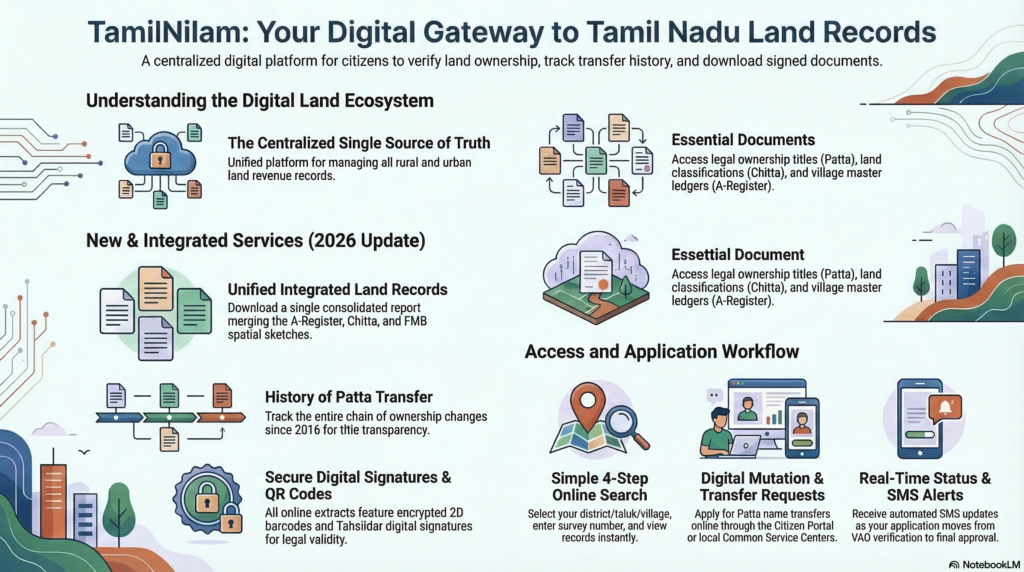
What is the TamilNilam Portal?
TamilNilam is the state’s official digital land records management system, designed to modernize record-keeping, minimize property disputes, and enhance administrative transparency. The state government banned the issuance of manual, handwritten land record extracts, making TamilNilam the mandatory, centralized software for all online mutations and land records.
Whether you need to view your property details, apply for a Patta transfer, or download survey maps, TamilNilam serves as your one-stop digital hub.
Key Services Offered on TamilNilam
The TamilNilam portal empowers citizens to access essential property documents without visiting the Taluk office. Here are the core services you can utilize:
Viewing Patta and Chitta Details
The Patta is a crucial legal document proving land ownership, while the Chitta provides specific property details, including the survey number, land area, and its classification as either Nanjai (wetland) or Punjai (dry land). These two have now been combined into a single document known as the Patta Chitta. You can easily view and download your Patta Chitta online to verify your ownership status.
Accessing FMB (Field Measurement Book) Sketches
An FMB Sketch is a highly detailed land survey document that defines the exact boundaries, measurements, and layout of a land parcel. It acts as the legal blueprint of your property, showing adjacent survey numbers and boundary references. Downloading the FMB sketch is vital for property registration, securing bank loans, and resolving boundary disputes.
Checking the A-Register Extract
The A-Register serves as the village master ledger, providing a parcel-by-parcel account of all land in a specific village. It contains functional data such as the unique survey and subdivision numbers, soil classification, irrigation sources, and the current legal title holder’s details.
How to Apply for a Patta Name Transfer Online
If you have recently purchased a property, updating the ownership records is a critical next step. The TamilNilam system handles both simple and joint Patta name transfers online.
Step-by-Step Application Process
Citizens can file applications for Patta transfers and subdivisions through Common Service Centres (CSCs) or directly via the e-services web portal. In some cases, TamilNilam enables automatic mutation; if your registration details perfectly match the online Chitta and there are no encumbrances, the title is updated immediately upon registration, and you are notified via SMS.
Documents Required for Patta Transfer
To ensure a smooth transfer, you must provide supporting legal documents. Typically, the approval process requires the upload of your registered sale deed and an Encumbrance Certificate (EC).
How to Track Your Application Status
Once you submit your request, you can easily track your Patta name transfer status online using your application ID. The portal is designed to send SMS alerts to keep you updated on the progress, approval, or rejection of your application.
Common Issues When Using TamilNilam (And How to Fix Them)
While TamilNilam has revolutionized land administration, users occasionally encounter roadblocks.
One frequent issue involves data entry errors in the UDR A-Register and the TamilNilam website, such as incorrect spelling of the owner’s or father’s name, wrong land sizes, or incorrect land classification. For instance, a 17-acre property might be wrongly recorded as 11 acres, or wetland might be listed as dry land.
To correct these specific errors, you must file a petition with the District Revenue Officer (DRO). The DRO will request verification reports from the Village Administrative Officer (VAO), the Revenue Inspector, and the Tahsildar before ordering the official correction in the system. Additionally, users may sometimes face technical and procedural delays due to server downtimes or the ongoing integration of historical data in certain urban areas.